What it does
One operator, one PC, a whole race day.
It tells you what's next
Race day opens on one question: what happens now. HeatCaller names the next round, counts what's left to run, and puts a single start button under it. A readiness check sits alongside — five of six done, still to do: connect the timer — so nothing gets missed in the noise before the first heat.
Race Day · Race Control
It calls the race out loud
Position changes, lap counts, best laps and the last-lap warning, spoken through whatever speakers the track already has. The voice runs on the timing PC itself, so it keeps talking when the Wi-Fi doesn't, and the sound set is yours to change.
Voice · Sounds
Tonight's running order
Build the night from qualifiers into mains, per class, and watch each round move from scheduled to next to run. Move the top finishers up between rounds, pull a timetable or the standings, assign marshals. Right-click anywhere in the list for the rest.
Race Day · Classes · Championship
Everyone checked in
Keep the roster between race days instead of rebuilding it every week. Check drivers in as they arrive, sort them into classes, and track what each one is running out of the garage. The day's counts stay visible: who's in, who's checked in, who's still missing.
Driver Hub · Classes · Garage
Real transponder laps
Reads the decoder directly, so laps are hardware-accurate rather than thumb-on-a-stopwatch. Practice sessions run on the same timing as racing, and track layouts are stored so lap times mean something when you compare them later.
Practice · Track Layouts
The season, not just the night
Every race day lands in history, with analytics across rounds and a championship table that carries between them. Chase a ghost car of an earlier lap, or collect achievements — the small stuff that makes a club night competitive beyond the podium.
Race History · Race Analytics · Ghost Cars · Achievements
The app
This is race day, three minutes before the first heat.
Three classes in, three drivers checked in, nothing run yet — and one thing left on the list before anyone can go out.
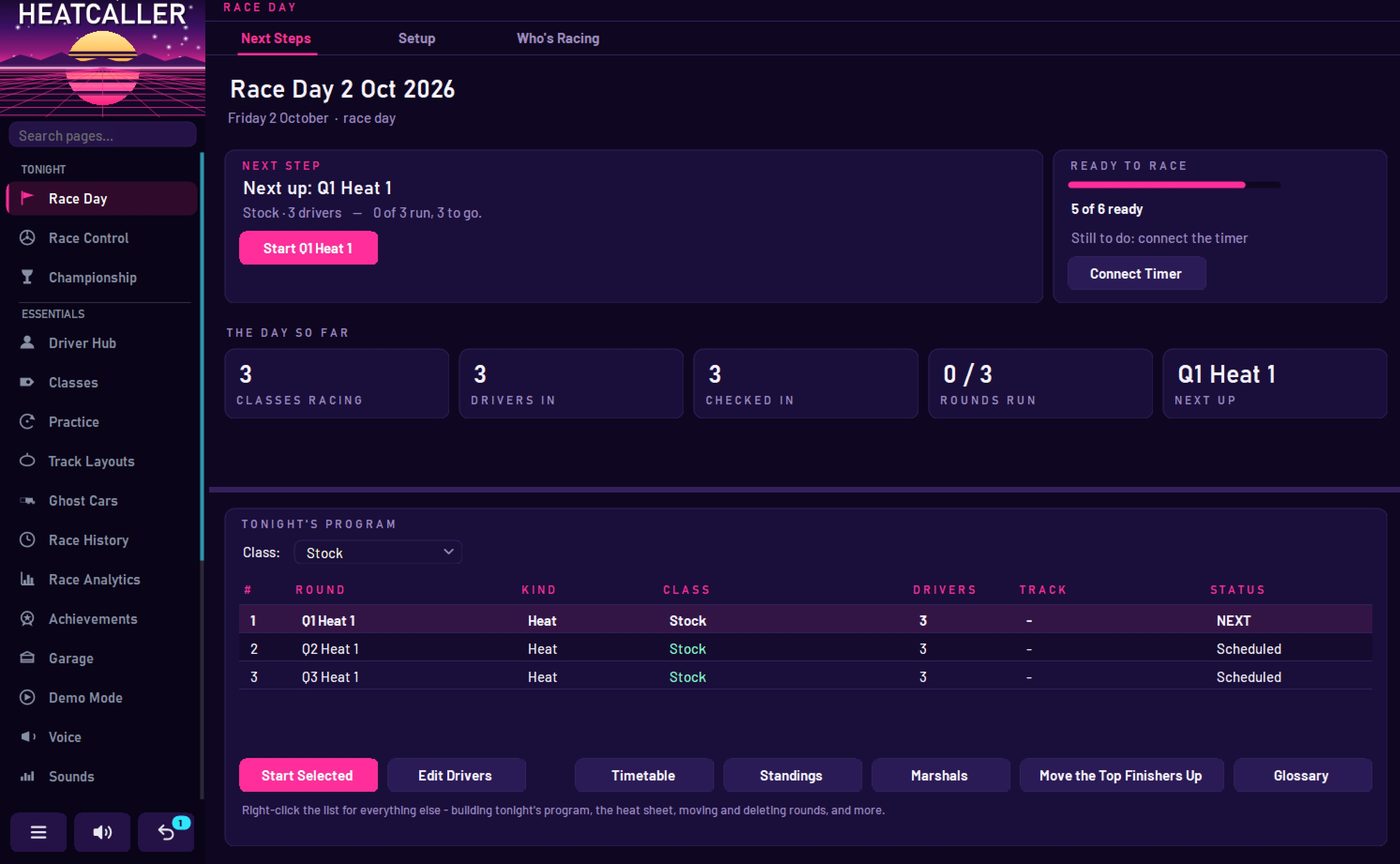
The next round, who's in it, how many are left to run, and a button that starts it. No hunting through menus with drivers waiting on the rostrum.
A readiness bar that counts what's actually done and names what isn't. Here it's the timer — one click away, rather than a mystery at the moment the lights go green.
Qualifiers queued per class, each moving from scheduled to next to run, with the timetable, standings and marshal list a button away.
Hardware
Built against the decoders club tracks actually own.
HeatCaller talks to EasyLap and I-Lap systems over USB. Plug the decoder into the timing PC, pick the port, and it starts reading passes — no bridge software, no subscription, no account.
It was written for a working Mini-Z track and runs there every race day, which is the only test that counts.
No decoder in front of you? Demo mode runs a full race day on fake laps, so you can see the whole night — program, callouts, standings — before any hardware is involved.
- DecodersEasyLap · I-Lap
- ConnectionUSB / serial
- Operating systemWindows 10 · 11
- Audio outAny PA or powered speaker
- InternetNot required
- No hardware yet?Demo mode
- StatusBeta coming soon
Beta is coming.
HeatCaller runs at one track today. The beta goes out once it can survive a full race day on somebody else's hardware — different decoder, different PC, different Saturday.
If you run a club track and want to be in that first group, say so and tell me which decoder you're on.
hello@heatcaller.com